
I gave my fridge door a hard retirement. The Apolosign 15.6″ Digital Calendar is the family co...
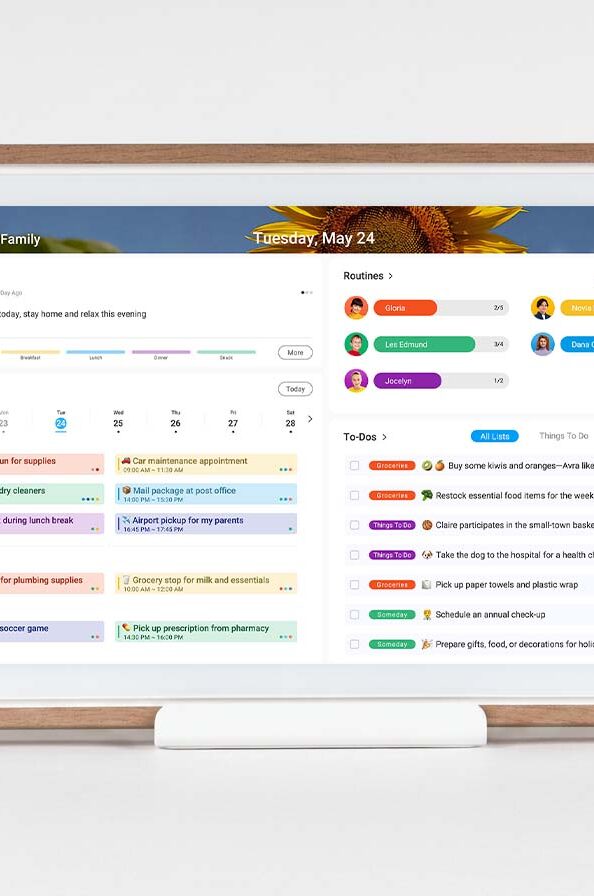
Let me paint you a picture. My fridge door was a crime scene. Sticky notes in three different handwriting styles, a dentist appointment reminder from four months ago that I kept meaning to throw away and somehow never did, a chore chart that had become purely decorative, and a grocery list that lived on the fridge and died on the fridge, never once making it to an actual store. I had systems. Multiple systems. Colour-coded, cross-referenced, optimistically labelled systems.
Every single one of them had failed me.
The Apolosign 15.6″ Digital Calendar is the first thing that actually replaced all of it. Not digitized it. Not created a parallel system I had to maintain alongside the paper one. Replaced it, completely, and made the wall space it occupies feel like the most useful square footage in my home.
That’s a strong opening claim. I stand by it.

What it actually is
Before we get into what it does, it’s worth being clear about what this thing is — because it’s genuinely different from anything else in its category.
The Apolosign is a 15.6-inch touchscreen display that runs two completely separate operating modes. Calendar Mode is a dedicated family organization system — built from scratch for the specific chaos of managing a household with multiple people, multiple schedules, and multiple competing priorities. Android Mode is a full Android OS where you can download apps, build a custom widget dashboard, and use the screen however you want.
Both modes live on the same device. You switch between them on demand. The screen that’s showing your family calendar in the morning can be showing a custom smart home dashboard by the afternoon, and neither mode compromises the other.
Most smart displays make a choice. A Google Nest Hub does calendar and smart home control but nothing beyond its own ecosystem. A generic Android tablet does everything but organizes nothing and ends up being used exclusively for YouTube. The Apolosign doesn’t make that choice, and the refusal to make it is exactly what makes it work as a household device rather than a single-use gadget that earns a shelf and then a drawer.
Calendar Mode: where it spends most of its time
This is the mode that earns the wall space, and it’s where the Apolosign is genuinely best in class.
The calendar sync covers Google Calendar, Apple iCloud, Outlook, Yahoo, and Cozi — simultaneously, without conflict, without requiring you to designate a primary or manually reconcile two systems that don’t agree on what Thursday looks like. In a household where two adults run on different calendar ecosystems because their work setups never aligned, and the kids are on a shared family calendar that’s technically on Google but practically managed by whoever remembered to update it, this just works. Everything lands in one view. It stays current. You stop having the conversation where someone didn’t know about something because it was in the wrong app.
The chore and routine system is where it gets specifically clever. You build out daily tasks, assign them, and the calendar tracks completion through a points and rewards structure. I want to be honest about what this is and what it isn’t — it is still fundamentally a chore chart, and children will still negotiate creatively about whether “tidying your room” counts if you’ve relocated the mess to a less visible location. The Apolosign cannot fix that particular dynamic.
What it can do is change the visibility and accountability of the system in a way that paper charts simply don’t. A screen at eye level in a high-traffic area, showing tasks and completion status and accumulated points, gets engaged with differently than a list on the fridge that everyone has learned to look through rather than at. The points and rewards structure adds enough game logic to make the whole thing feel less like a demand and more like something with stakes. That distinction matters more than it sounds when you’re dealing with people who are deeply motivated by fairness and deeply unmotivated by the concept of vacuuming.
The meal planning feature is quieter but earns its place consistently. You can plan meals by day, save recipes to a running collection, and have a visual overview of the week’s food without opening a separate app, consulting a notebook, or standing in front of an open fridge at 6pm making decisions you should have made at 10am. That last scenario is one I am personally familiar with, and the meal planning view has reduced its frequency in a measurable way.
The Message Board replaces the fridge notes. You post reminders, countdowns, and messages—and because it’s a lit screen at eye level in the kitchen rather than a piece of paper that has been there long enough to become invisible, it actually gets read. My grocery list now travels to the grocery store because it lives in the companion app on my phone, synced live from the board. This sounds like a small thing. It is not a small thing.

Android Mode: the one that genuinely surprises you
Switch to Android Mode and the Apolosign becomes a different device with a different purpose. Full Android OS, access to the Play Store, a widget-based dashboard you configure yourself. Weather, music controls, stock tickers, smart home camera feeds, doorbell integration — whatever you want on a wall-mounted screen, you can build it here.
The Google Home integration is where this gets interesting for anyone with a smart home setup. Compatible doorbells and cameras feed directly to the screen, which means you can see who’s at the door without reaching for a phone. In the middle of cooking dinner, that’s not a convenience—it’s the difference between burning something and not burning something.
Google Assistant is built in and works as expected. Hey Google handles the standard queries, and Gemini AI is accessible for anything that needs more than a quick answer. The voice control response is fast enough that reaching for the screen has become the backup rather than the default, which is the right way around.
The customizable dashboard is where Android Mode earns its place as a mode rather than just a bonus feature. You’re not locked into a preset layout or a brand’s idea of what your wall should display. You add widgets, arrange them, remove them, and build something that actually reflects how your household operates. That flexibility is rarer in this category than it should be.

The hardware
The 1080p LCD display has a 10-point touchscreen that responds cleanly without requiring exaggerated or deliberate taps. In a kitchen or living room environment where you’re touching a screen with varying levels of attention and occasionally varying levels of clean hands, that responsiveness matters.
The anti-glare matte glass finish handles natural light well. In a room with windows, the screen stays readable without washing out, which is the baseline requirement for anything mounted on a wall in a home that isn’t a darkened cinema. It clears that bar without making you think about it, which is exactly what you want from a display coating.
The rotating stand supports both portrait and landscape orientation, so the physical placement options are flexible depending on where it lives in your home. The one-swipe privacy cover is a feature I didn’t expect to use and now reach for regularly — when guests are around, your family schedule doesn’t need to be visible, and one swipe replaces it with a photo screen instantly. It’s a considered detail that signals the product was designed by people who thought about real use rather than demo conditions.
Auto brightness adjusts to the room. Sleep mode means it’s not illuminating your kitchen at 2am. Both of these are small details that you stop noticing because they just work correctly, which is the best outcome for any feature in this category.
It comes in four colors: Teak Yellow, Spruce Grey, Black, and White. The Teak Yellow doesn’t look like a tech product that wandered into your home and apologized for its presence. It looks deliberate. The Spruce Grey disappears against a wall in the best possible way. Whichever direction your interior goes, there’s an option that doesn’t fight it.
The honest part
At $279 on sale from $349, this is a real purchase that deserves a real decision. But the value calculation is more straightforward than the price tag initially suggests.
If you’re currently managing a household across multiple calendar apps, a chore system that works inconsistently, grocery lists that don’t survive the journey from home to store, meal planning that happens in your head until it doesn’t, smart home controls spread across three apps, and a fridge door that is doing its absolute best — this consolidates all of it onto one screen you walk past ten times a day.
There is no subscription. You pay once, and everything is yours. In a category where smart home products are increasingly building monthly fees into features that should be standard, that’s worth saying plainly and clearly.
The 21.5-inch, 27-inch, and 27-inch 4K options are available for larger walls or bigger households. The 15.6-inch is the right entry point for most kitchens and the most sensible place to start.
The bottom line
The Apolosign 15.6″ Digital Calendar is the first smart display I’ve used that was designed around how a household actually operates rather than how a product demo looks. The dual-mode system is genuinely useful. The calendar sync is comprehensive and conflict-free. The chore system works better than paper — not because it’s magic, but because visibility and accountability are different on a screen. The Android Mode adds real flexibility that most family-focused displays don’t offer and don’t try to.
My fridge door has exactly one thing on it now. A magnet my kid made at camp.
The Apolosign gets the rest.
Apolosign 15.6″ Digital Calendar — $279 (on sale from $349). Available at apolosign.com.


